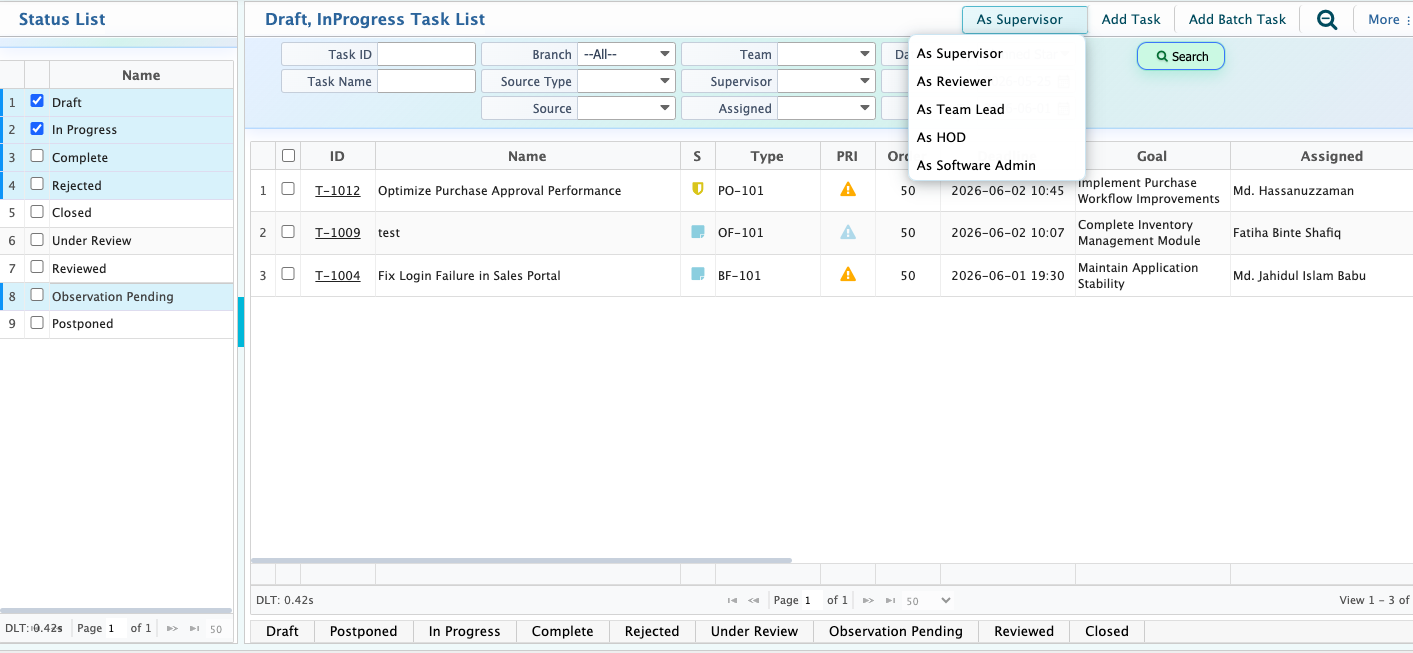
Task Administrator
The Task Administrator serves as the central workspace for monitoring, managing, and reviewing tasks throughout their lifecycle. From this screen, users can view tasks based on their current status, track assignments, monitor deadlines, and perform administrative actions according to their role and responsibilities.Tasks are organized into separate status-based views, including Draft, In Progress, Complete, Rejected, Under Review, Observation Pending, Reviewed, Postponed, and Closed, allowing users to quickly identify tasks that require attention at different stages of the workflow.
The task list displays important information such as Task ID, Task Name, Task Type, Priority, Deadline, Related Goal, Assigned User, Estimated Start Date, Estimated End Date, Estimated Time, Team, Supervisor, Reviewer, Description, Source Type, and Branch.Users can switch between different responsibility-based views such as As Supervisor, As Reviewer, As Team Lead, As HOD, and As Software Admin to monitor and manage tasks relevant to their role.
From the Task Administrator, users can create new tasks using Add Task or create multiple tasks at once using Add Batch Task. The available search and filtering options helps to locate specific tasks based on status, assignee, goal, deadline, or other task-related information.