Task Kanban
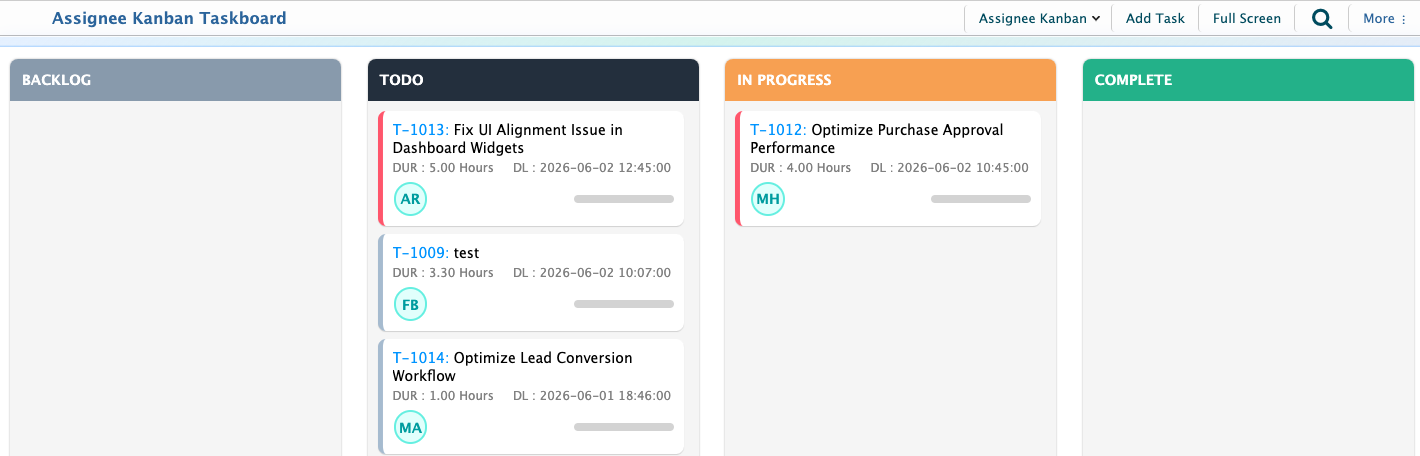
The Task Kanban in PrismERP provides a visual way to manage and track tasks based on their current progress. Instead of viewing tasks in a traditional list, users can monitor work through an interactive board where tasks are organized into workflow stages such as Backlog, To Do, In Progress, and Complete.Each task card displays key information including the Task Number, Task Name, Estimated Duration, Delivery Deadline, and Assigned User, allowing users to quickly understand the status, workload, and priority of ongoing activities.
Users can switch between different Kanban views such as Assignee Kanban, Reviewer Kanban, and Supervisor Kanban to monitor tasks from different perspectives. This helps team members focus on their assigned work, reviewers track tasks awaiting validation, and supervisors oversee task execution across teams.As work progresses, tasks can be moved between stages, providing a real-time view of task status and overall workflow within PrismERP. This visual approach makes it easier to identify pending tasks, monitor ongoing activities, and track completed work without navigating through multiple screens.
From the Task Kanban, users can also create new tasks using the Add Task option, switch to Full Screen mode for a larger workspace, and access additional task management options through the More menu. The board updates automatically as task statuses change, providing an up-to-date view of project and operational activities across the organization.